

Omnichannel help desk: What it is & why it matters
An omnichannel help desk connects email, chat, voice, and messaging into one conversation. See how it works, why it matters, and what to look for.

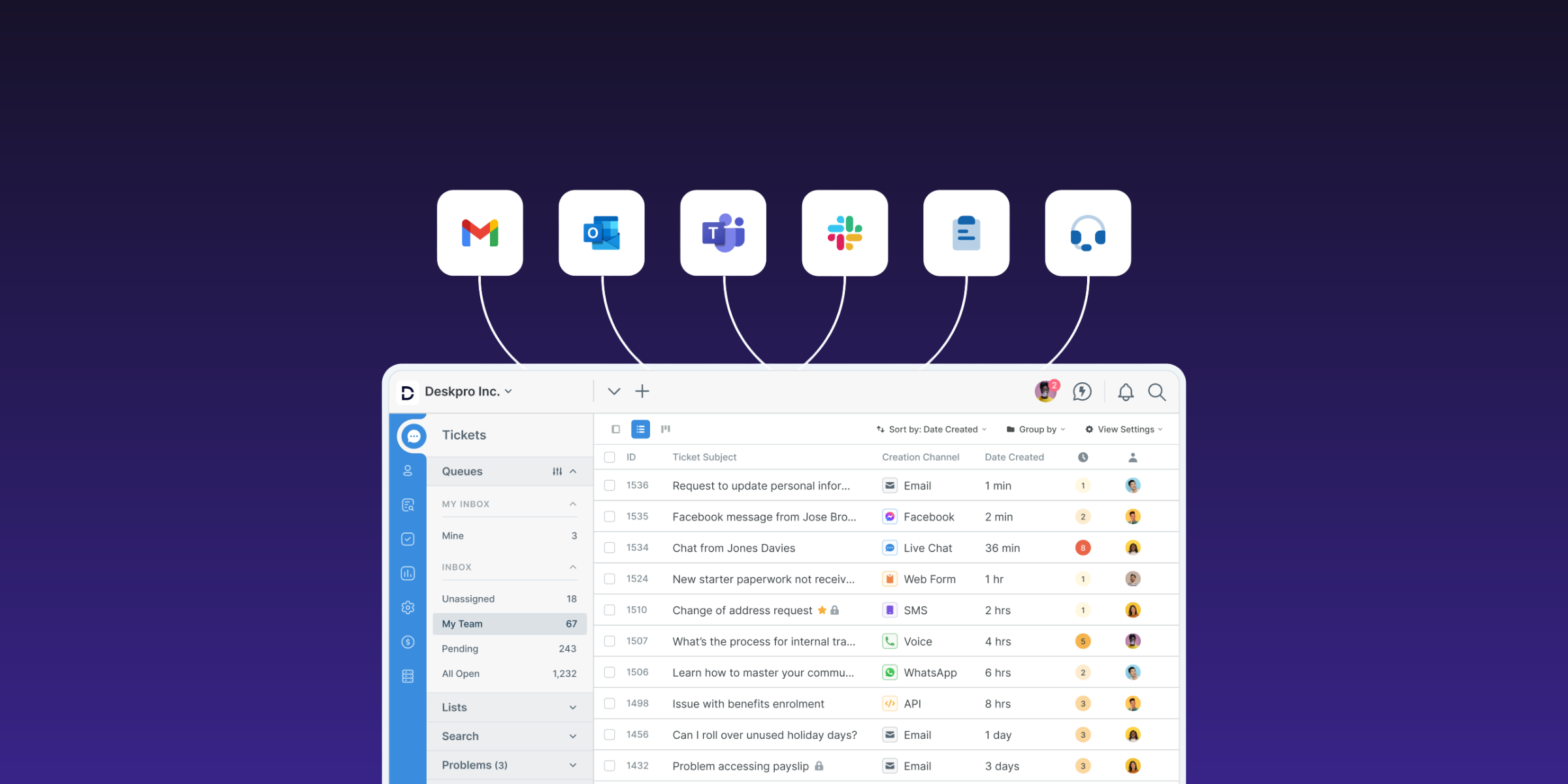
A customer emails your support team about a billing error. An hour later, with no reply, they open live chat on your website and explain the problem again. The chat agent can't see the email, so they ask for the account number and promise a follow-up. By the afternoon, the customer calls, reaches yet another agent, and starts from the beginning for the third time. At this point, the customer is probably ready to rant about their poor service experience to anyone who will listen, and you have three agents working three different tickets for the same issue.
Internal support teams aren’t immune from this challenge either. An employee might message IT in Microsoft Teams about a VPN problem, hear nothing back, then submit a form through the internal help center. Two technicians end up working the same problem without getting the full story.
That’s what support looks like when channels sit in silos. “Omnichannel” is the word software vendors use for the fix. But, to badly paraphrase The Princess Bride, vendors keep using that word, and I do not think we always know what it means.
The purpose of this guide is to give you a straightforward answer. Below, you’ll learn what an omnichannel help desk is, how it differs from multichannel support, what omnichannel support looks like day to day, why it matters, and what to look for when you evaluate options.
What is an omnichannel help desk?
An omnichannel help desk is a support platform that brings every channel your requesters use (email, live chat, phone, social media, messaging apps, collaboration tools like Slack and Microsoft Teams, and web forms) into one system. Each request becomes a single connected conversation with its full history attached, no matter which channel the person used to reach you.
“Connected” is the key word here. Plenty of help desks let you add five or six channels. What makes a help desk omnichannel is that context follows the requester from one channel to the next so an agent can pick up the ticket without making the customer repeat themselves or duplicating work someone else has already done.
You'll also see the broader term omnichannel customer service, which usually describes a company-wide customer experience strategy. The goal of omnichannel customer service or support is to enable customers to contact you through their preferred channels, and seamlessly continue a conversation across channels as needed.
Omnichannel vs. multichannel support: What’s the difference?
If your team uses several channels for support but each one runs on its own platform, then you’ve got multichannel support. With multichannel, agents often have to toggle between tools, connecting disparate pieces of information like they’re detectives building an evidence board. Or they simply miss information from a conversation that started in another channel.
Omnichannel support brings all conversation records into one place so agents get the context they need without switching systems.
|
Multichannel |
Omnichannel |
|
|---|---|---|
|
Channels offered |
Several channels, each managed separately |
Several channels, managed in one system |
|
Customer history |
Split across tools, with a separate record per channel |
One profile and timeline across every channel |
|
Agent view |
Multiple inboxes, tabs, and logins |
One workspace showing every interaction |
|
Switching channels mid-issue |
Requester starts over, often creating a duplicate ticket |
Conversation continues with context intact |
|
Reporting |
Separate reports per channel, combined by hand |
Unified reporting across every touchpoint |
The short version: multichannel is about being available on the channels your requesters use. Omnichannel is about being consistent no matter how your requesters reach out.
How an omnichannel help desk works
Here’s what an omnichannel ticketing system does with a request from the moment it arrives:
1. Requests from every channel become tickets
You choose which support channels to connect to your help desk, and any time someone submits a request through one of those channels, it automatically becomes a ticket within the help desk so agents have one place to work.
2. Identity and history live in one place
Requests from the same person are linked to that user’s profile, so when a customer who emailed on Monday opens a chat on Wednesday, an agent can view their profile to see all their previous tickets and relevant account details.
3. Routing works across channels
Routing rules determine who gets assigned a request based on criteria your admins set. This can include topic, language, priority, team, VIP status, and so on–you configure the routing to work the way your team does. A ticket goes to the person best-suited to handle it regardless of the channel it came from.
4. SLAs and automated workflows are consistent
Service Level Agreements (SLAs), escalation rules, and automated workflows run the same way on every channel. An urgent request doesn't get a slower response target because it came in through a social DM instead of email.
5. Reporting covers all channels
Because everything lives in one system, leaders see volume, first response time, resolution time, and Customer Satisfaction (CSAT) scores across all channels in one place, along with the channel mix behind those numbers.
Why an omnichannel help desk matters
The benefits of omnichannel support show up for support team leaders, agents, and the customers or employees you assist.
- Faster resolution. When agents have one place to see what the requester already said, they spend less time hunting down information and can get straight to solving the problem.
- Less duplicate work. All previous communications from a requester are linked to that user and visible to agents. Without that link, three agents might spend time working on the same problem that’s been raised in three channels (and might give three different answers).
- A better experience for customers and employees. Requesters can use whichever channel works best for them in the moment (chat from their desk at work, WhatsApp from a phone, a call when it’s urgent) and get a consistent experience, without having to repeat themselves if they switch channels.
- Accurate reporting. Leadership sees true request volume and channel mix instead of numbers stitched together from separate tools. That makes staffing decisions, like whether you need more chat coverage in the afternoons, easier to justify.
- A stronger foundation for AI and automation. AI features that are grounded in your organization’s knowledge work best when all your support conversations live in a single platform.
Omnichannel support for internal teams: IT, HR, and facilities
External customers aren’t the only ones reaching out to Support through multiple channels. An employee might Slack someone they know on the IT team for help with their workstation, email the HR department with a sensitive question, or submit a web form to Facilities Management about a broken badge reader.
If these separate channels aren’t connected in the same system, a lot of that support demand never gets recorded. Requests submitted informally through Slack or Teams get buried under other notifications and eventually lost. Internal support department leaders don’t have a clear sense of how many requests their team is handling, which makes it difficult to make the case for increasing headcount.
An omnichannel help desk turns messages from different internal communication systems into tracked tickets. With a Slack or a Microsoft Teams integration, an employee's message becomes a ticket without them leaving the tool they already work in. Requests from portals, forms, and email join the same queue, and each employee gets one history. A single platform can serve IT, HR, and facilities, each with its own workspace, forms, and routing rules, so you don't need three separate tools.
Common omnichannel challenges (and how to avoid them)
Omnichannel support isn’t something you can half bake. Here are some of the most common issues that come up when teams decide to “do omnichannel” and how you can prevent them:
- Adding channels you can’t staff. It’s better to have one or two channels that you can fully staff than five or six channels that get neglected. Start with the channels your requesters already use, staff them properly, and add more gradually as needed.
- Bolted-on channels. Some platforms require you to add channels through separate apps or third-party integrations that don’t share a record with the core help desk. Before you buy, make sure your help desk offers native support for the channels you need so user profiles and reporting are centralized.
- Inconsistent SLAs and tone across channels. If chat agents follow one set of standards and email agents follow another, customers notice. Define response targets, escalation paths, and tone guidelines once, then apply them everywhere, adjusting only where a channel calls for it (chat replies are shorter than emails, for example).
- More data to govern. The more channels you’re offering support on, the more places you’re collecting personal data from. You need to know where that data is stored and who can access it when it’s pulled into your omnichannel help desk, especially if your organization has data residency requirements or must be GDPR-compliant.
What to look for in an omnichannel help desk
Your exact criteria for an omnichannel help desk will depend on your organization and the way you operate. When building your list of must-haves and nice-to-haves, get feedback from the agents and admins who will be using the platform every day, and talk to your Security and Compliance team to make sure you understand any deal-breakers.
When we speak to support leaders looking for an omnichannel ticketing system, these are the needs that come up most frequently:
- Native support for channels in use now (plus those expected to be added later)
- Clear terms on channel access (e.g., does adding voice or WhatsApp require a higher-tier plan or paid add-on?)
- A unified view of requester history across every channel
- Routing, SLAs, and automated workflows that can be consistently applied across channels
- Unified reporting that covers every channel
- AI features that help agents do their best work regardless of channel (e.g, summarization of long ticket threads, suggested replies based on similar tickets, tone refinement)
- Support for both external customers and internal departments
- Deployment options that match your data requirements, whether that’s cloud (standard SaaS model), VPC, sovereign cloud, or on-premise
How Deskpro delivers omnichannel support
Deskpro is an omnichannel help desk built for both customer support and internal service teams, including IT, HR, and other internal operations departments. You can create separate workspaces and queues for different teams or departments, with routing rules that direct requests to the relevant team. There are also no plan-based limits on which channels you can connect.
No matter which channels you connect, Deskpro keeps them from becoming siloed. All requests that come in are linked to the person who submitted them, so if someone has reached out about the same issue through multiple channels, that’s visible to the agent. The agent can easily merge tickets so that the full history of the issue sits together, and if the agent switches channels when they follow up, that gets logged in the same ticket thread.
You can also apply automated routing and workflow rules across channels, or segment rules by channel as needed. And our AI features, including sentiment analysis, intent detection, ticket summaries, and suggested replies, work the same way regardless of channel.
Another one of the big benefits of using Deskpro for omnichannel support is that you get unified reporting. You can use pre-built and custom reports to show response times, resolutions rates, SLA performance, and other metrics you care about across every touchpoint. Everything is available through one auto-updated dashboard.
Finally, one of the key things that makes Deskpro stand out is the fact that you can choose the deployment model and get the same capabilities regardless of where you deploy. Deskpro runs in the cloud, in VPCs, in private and sovereign cloud environments, or on-premise. For regulated teams that can’t send call recordings or messaging data to a shared multi-tenant cloud, this means you get full channel coverage and keep control of where that data lives.
The channels your customers and employees use might change over time, but a help desk that connects all your channels in one place, and runs where your data needs to stay, lets you keep up as your organization’s needs evolve.
See how Deskpro can meet your omnichannel needs by booking a demo or taking a self-guided tour.
FAQs
What does omnichannel support mean?
Omnichannel support means every channel a customer or employee uses to contact you (email, chat, phone, social media, messaging apps, collaboration tools, and forms) connects to one system. Each request is linked to a requester in the system, so the person can switch channels without starting over and any agent can pick up where the last one left off.
What is the difference between omnichannel and multichannel customer service?
Multichannel customer service offers several channels that each operate separately, with their own inboxes, histories, and reports. Omnichannel customer service connects those channels so one record follows the requester. In a multichannel setup, a customer who emails and then calls usually has to explain the issue twice. In an omnichannel setup, the agent on the call sees the email thread and continues the same conversation.
What is an example of omnichannel customer support?
A B2B customer submits a form through a manufacturer’s help center about a delayed shipment. An agent follows up by email, and the customer's reply becomes part of the same ticket. Two days later the customer calls. The phone agent sees the web form and the email thread, confirms the replacement has shipped, and closes the ticket. That's three channels and one conversation, and the customer never had to repeat the order details.
Is an omnichannel help desk the same as a CRM?
No. A Customer Relationship Management (CRM) system tracks the commercial relationship (leads, deals, contacts, and account activity), mostly for sales and marketing teams. An omnichannel help desk manages support requests: receiving them from every channel, routing them, tracking SLAs, and resolving them. The two often integrate, so agents can see CRM account details inside the ticket.
Which channels should an omnichannel help desk include?
Start with the channels your customers or employees already use, then expand as demand shows up. For many teams, the core is email, web forms, and sometimes live chat. Phone is also still a frequently used channel for urgent or complex issues, WhatsApp and SMS are popular with mobile-first customers, and Slack or Microsoft Teams are often used for internal support.
Can an omnichannel help desk be used for internal IT and HR support?
Yes. Employees contact internal teams through Slack, Microsoft Teams, email, portals, and phone, so IT, HR, and facilities teams face the same fragmentation as customer support. An omnichannel help desk turns those messages into tracked tickets with one history per employee, applies routing and SLAs consistently, and gives managers accurate data on request volume.