
Understand your customers
Collect feedback at the right moment and build improvements around what customers actually tell you.
Arm your team with CSAT tools, real-time analytics, and automation capabilities to proactively address customer concerns, make data-driven decisions, and enhance customer retention.
Collect feedback at the right moment and build improvements around what customers actually tell you.
Data provides insights let you pinpoint areas of weakness that your organization can improve upon.
Customers who feel heard come back. Use feedback to fix what matters and strengthen relationships.
In-built CSAT software makes measuring and analyzing customer feedback simple.
Gather valuable insights and never question how customers feel about your brand and services. Customers can give the support they received a rating; positive, neutral, or negative.
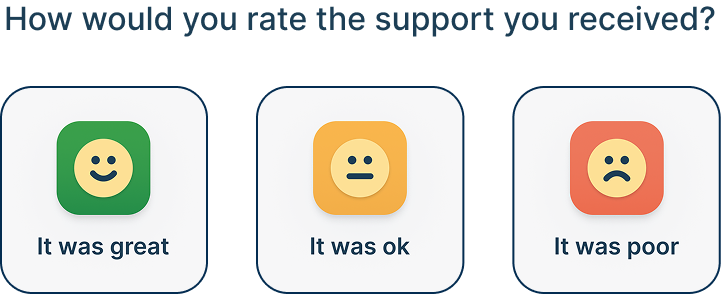
Automatically send a survey request when a ticket is resolved to get instant feedback on the support received.
Customers can rate and comment on individual agent replies through the help center or via email.
Automated Responses
Build automations to prioritize and address issues from dissatisfied customers proactively. Ensure every survey response is addressed, enabling your team to improve continuously at each stage of the support journey.
Keep track of the customers that leave a positive response and analyze where your organization is performing well.
Keep a careful eye on neutral scores, identify smaller issues and improvements that can boost your service for customers.
Automatically add managers to follow issues and label urgency to carefully monitor and fix any issues.
Track satisfaction as it happens. Identify patterns, catch dips early, and understand what your customers actually think about your support.
Design feedback forms that surface the data you need. Customize email templates, create surveys per department or service, and gather specific feedback you can actually act on.
Choose to send a survey after each reply, on ticket resolution, or both.
Set the send window anywhere from seconds to weeks after resolution.
Decide whether agents can view feedback, or restrict access to admins only.
Rating support should take seconds. Customers can submit their satisfaction rating directly through the Help Center — no extra accounts, no friction.
CSAT is built into Deskpro, not a third-party add-on. Survey responses feed directly into the same reporting layer as your ticket data, so you can correlate satisfaction scores with response times, agent workload, or ticket channel. A negative CSAT response can trigger an automation that adds a manager as a follower, increases ticket urgency, or sends an internal alert, all without manual intervention. For teams using customer support analytics to make staffing or workflow decisions, CSAT data sits inside the same help desk reporting dashboards they already use, not in a separate tool that needs manual exports.
The short answer is speed of response to dissatisfaction. In Deskpro, you can configure automations that fire the moment a negative CSAT rating comes in: flagging the ticket, escalating to a manager, and adding the customer to a follow-up workflow. It gives you the opportunity to respond to a dissatisfied customer in hours, not weeks later after a monthly dashboard review. Tracking neutral scores over time in help desk reporting is also useful, since neutral scores can point to customers who are undecided about renewing. For B2B customer service teams managing accounts with renewal cycles, that visibility is the difference between a proactive save and a lost contract.
Yes. You can customize question text, email templates, and survey timing per department or service type. An IT team running a help desk might use a different survey question than a customer support team, for example. A resolved billing ticket might warrant an immediate survey. A complex implementation issue might need a two-week delay before the customer can fairly rate the support they received. Deskpro lets you configure both the what and the when. You also control who sees responses. Agent-level visibility can be enabled or restricted to admins only, which matters for teams where peer performance data is sensitive. For organizations running multi-brand help desk setups, each brand can have its own survey configuration, so feedback data stays scoped to the right operation.
Yes, this is a part of Deskpro's help desk automation engine. When a negative response comes in, you can configure triggers that immediately escalate the ticket, add a manager as a follower, apply an urgency label, or send an internal notification to the relevant team lead. Positive responses can trigger a different set of actions, for example flagging the conversation for a customer success follow-up or contributing to an agent performance report.
Surveys in Deskpro are embedded directly into the ticket resolution flow. You can configure your surveys so that when a ticket closes, the customer gets a satisfaction rating request either through the Help Center or by email. Rating the interaction takes a single click. Customers can also rate individual agent replies rather than just the resolved ticket, which gives you granular data on which parts of the support interaction went well and which did not. For omnichannel customer support teams, this feedback loop covers every channel in one place rather than requiring separate tools per channel.
CSAT data in Deskpro rolls up from the individual response level to the agent level, team level, and organization level. You can build custom reports to track which agents consistently receive positive ratings, where neutral scores cluster by department or ticket type, and how satisfaction trends over time. Custom help desk reporting combines CSAT with SLA compliance, response times, and ticket volume, so satisfaction scores are always read alongside the operational context that explains them.
Yes. CSAT in Deskpro works for internal support operations as well as external customer support. HR help desk teams use it to measure employee satisfaction with HR support responses. IT help desk teams use it to track how employees rate IT support, which feeds into service improvement decisions and capacity planning. The survey configuration, timing, and visibility controls work the same way internally as they do for customer-facing support. For organizations running both external customer support and internal department support from the same Deskpro instance, each function can have its own CSAT configuration, keeping feedback data separate while still accessible to central operations through help desk reporting.