
7 ways to improve support operations with automated help desk workflows
Manual processes are slowing your support team down. See how automated help desk workflows can eliminate bottlenecks and improve performance.

If your support team is relying on fully manual processes to manage their workload–from triaging tickets to writing individual responses for every ticket–it’s not sustainable. And it’s not a good experience for the employees or customers who rely on your support.
As ticket volumes increase, tickets become more and more likely to age past your SLAs or get missed entirely, leading to agent stress and customer or employee frustration. The slow, inconsistent support experiences that arise from manual processes damage trust and your support organization’s reputation over time.
Automated help desk workflows introduce a toolkit to change this dynamic. They handle repetitive tasks and streamline processes that previously created bottlenecks, giving teams more time back for high-impact work and allowing them to deliver consistent, positive support experiences.
Below, we’ll walk through seven ways support teams can use automated workflows to reduce manual work and improve performance, along with real-world examples of how Deskpro customers are putting them into practice.
What are automated help desk workflows?
There are two primary mechanisms behind help desk automations: workflows can either be automated using rule-based criteria or AI.
Rule-based workflows
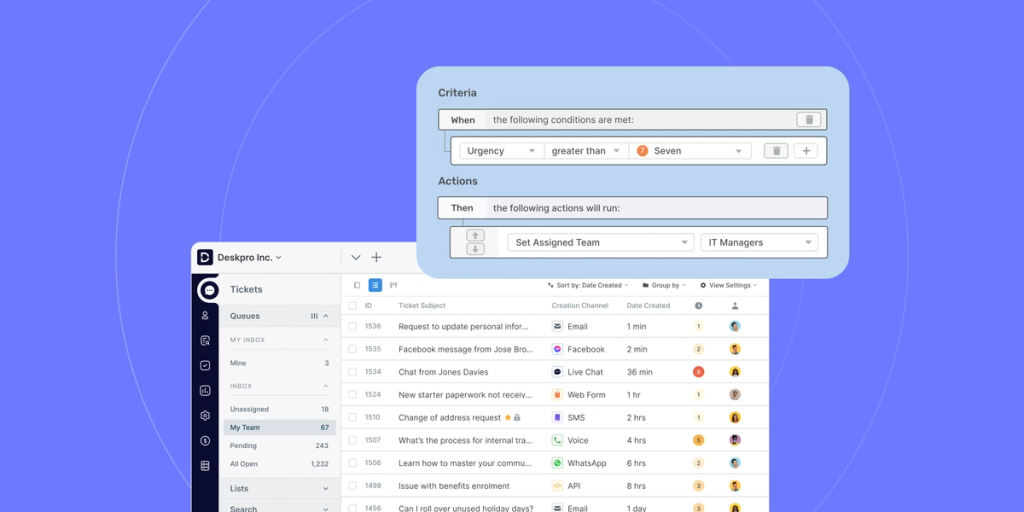
Rule-based automation uses “if this, then that” logic to trigger an action based on an event or time window. Examples of events in your help desk could include:
- New ticket creation
- A customer responding to a ticket
- An agent updating the status of a ticket
- A ticket nearing your SLA deadline without being resolved
When your help desk detects an event, the system checks for specific criteria you’ve set (e.g., keywords in an email subject line, ticket status, user language). If the criteria is met, the help desk automatically fires the action you’ve configured. This can help you do things like:
- Routing tickets to specific departments or agents
- Updating ticket properties
- Sending an automated follow-up message
- Adding SLAs
- Setting up an approval workflow
Rule-based workflows are objective: the same input always produces the same output, making them reliable and auditable.
AI-powered workflows
AI-powered workflows complement rule-based workflows by handling tasks that require judgement rather than just logic. AI uses natural language processing to understand what’s being said in a message and machine learning to analyze patterns, allowing you to automate workflows based on the context of a ticket. Examples of AI workflows include:
- Intent detection (used to categorize and route tickets to the most relevant team or agent)
- Sentiment analysis (used to categorize, route tickets, and set priority levels)
- Thank you detection (used to automatically mark tickets as resolved)
AI doesn’t guarantee accuracy the way rule-based logic does, so it’s important to have humans review outputs and provide feedback to maintain service quality and improve AI model performance.
Remember: your support team can always take an additive approach to automation. You can start with rule-based workflows, then layer on AI as your operations mature.
7 ways to use automated workflows in your help desk
New to automated help desk workflows and wondering where to get started? Here are seven recommendations to help you reduce manual work, improve response time, and set your agents up for success, along with several real-world examples of how our customers are using automated workflows:
1. Auto-route tickets to the right team
Manually assigning tickets as they come in is a huge time commitment, especially for support organizations that receive hundreds (or thousands) of tickets per week. It eats into time that managers could spend on more strategic work and agents could spend solving customer problems, and it can create bottlenecks and slower responses to customers.
Automated workflows allow you to use AI and rule-based logic to route tickets to the right teams and agents. With rule-based workflows, you can use criteria like channel, contact type, and keywords included in the ticket to automatically route tickets to the responsible team. With AI, you can use criteria like intent and sentiment to get even more nuanced with your routing. For example, you could set up a workflow that automatically routes all tickets with an “Angry” sentiment to a manager.
Real-world example: Advertising Specialty Institute (ASI) uses Deskpro to automatically route chat messages to the appropriate brand team based on the brand page the customer is on. Their Executive Director of Support, Matt Goldfarb, says, “Customers contacting us via our different brand pages automatically get connected to the most appropriate agents without having to go through a process that generates friction for them. That is a big win for us.”
2. Balance agent workloads with intelligent ticket routing
Help desk software like Deskpro allows you to automate ticket distribution so that certain agents aren’t being overloaded while others sit idly by. There are a few different ways to handle this, including:
- Round robin–When a new ticket is created, it automatically goes to the next agent in the queue, evenly distributing tickets across available agents.
- Least utilized–When a new live chat or phone call comes in, it goes to the agent in the queue who has handled the fewest tickets, helping to keep the workload balanced.
- Work shifts–You can set your team members’ working hours and automatically route tickets only to agents who are currently working (a great option for teams in multiple time zones).
3. Prioritize or escalate tickets so agents know what to tackle first
If you’re not prioritizing tickets by urgency, you risk having slow responses to time-sensitive or volatile issues–or having those issues fall through the cracks altogether–creating a bad employee or customer experience. Fortunately, automated workflows allow you to automatically set urgency levels based on factors like:
- Sentiment
- Issue type
- Age of ticket
- Approaching SLA deadline
You can also set up automated escalations, where a manager is added to a ticket once it meets certain criteria. This lets managers quickly see where they may need to jump in or work with the agent to ensure tickets are resolved by their SLA deadline.
Real-world example: Dominican University has an SLA to close tickets within five days, but before they started using Deskpro, they had no way to enforce that–and the average time to close a ticket was over 70 days. When they implemented Deskpro, they set up an escalation rule to add their support director as a ticket follower if an agent hasn’t contacted a client within 48 hours. They set up an additional rule to send the client an automated follow-up message if the agent asks for more information and doesn’t hear back in 48 hours, and to automatically close the ticket if the client doesn’t reply within 24 hours of that message.
They’ve now reduced their average resolution time to a little over three days, meeting their SLA and creating a much better experience for both their agents and clients.
4. Speed up responses with macros and snippets
If your help desk team receives a lot of repetitive queries, macros and snippets can help you respond faster and give your agents more time back to focus on complex issues.
Macros allow you to configure a set of rules to be applied consistently with a single click, streamlining repetitive tasks. Macro actions might include:
- Updating ticket details, such as status, priority, or custom fields
- Adding or removing labels
- Adding followers
- Sending a reply
Snippets enable you to save consistent replies to common questions in your help desk platform and add them to ticket responses while automatically populating case-specific information, such as a customer’s name or tracking number. You can insert snippets as part of the series of rules in a macro, speeding up the process of responding to common queries.
You can layer on AI by automatically generating responses based on your organization’s knowledge (such as help center articles, PDFs, or resolved tickets), having an agent or manager review for accuracy, then saving the response as a snippet. This helps you efficiently grow your snippet library so agents have a wide range of pre-canned responses to help them get started on a ticket.
Real-world example: Launchpad, an HR technology company, organizes snippets into categories in Deskpro. When a customer raises a ticket, an agent goes to Launchpad’s technical logs, determines the technical issue, then chooses the relevant pre-written snippet to form the base of the response. Nam Nguyen, Launchpad’s Director of Customer Success, says, “Snippets make up about 80% of each message sent to users. It greatly reduced response times and improved user experience.”
5. Automate follow-ups for better customer communication
Your agents can’t write an immediate reply to every ticket as soon as it enters your help desk, especially if the issue requires additional research or assistance from other team members. What they can do is send an automated follow-up to keep customers in the loop and set expectations about when they should expect a resolution.
Automated follow-ups are a ticket-level workflow that triggers a specific action at a scheduled time. Some ways to use follow-up automations include:
- Sending an automated ticket status message to customers or employees
- Reminding unresponsive customers or employees to follow up when the agent has asked for more information
- Sending agents internal reminders to act on a ticket
This helps agents provide timely communication and proactive support, increasing customer or employee satisfaction.
6. Enforce SLAs and identify problems before they compound
SLAs only work if you have a system to enforce them. Without automation, staying on top of SLA compliance means relying on agents to manually monitor ticket ages and managers to periodically check queues — a reactive approach that often catches problems too late.
Automated workflows let you build SLA enforcement directly into your help desk so that the right people are alerted at the right time, without anyone having to go looking. You can set up automations that:
- Alert agents when a ticket is approaching its SLA deadline without a response or resolution
- Notify managers when an SLA has been breached so they can intervene quickly
- Automatically increase ticket priority as the deadline approaches, ensuring it goes to the top of the queue
- Trigger escalations or reassignments if a ticket remains unresolved past a certain threshold
Real-world example: Laboratory Testing has configured alerts in Deskpro to notify HR team members when a deadline is approaching, making sure time-sensitive requests are never lost in the queue. They combine this with ticket priority levels to help their team prioritize tickets and deliver timely responses.
7. Streamline internal approval workflows
Tickets often stall when they require sign-off from the right person and there’s no structured way to get it. Without a defined workflow, requests get lost in email threads and agents are left chasing updates.
Approval workflows solve this by routing requests to the right approver automatically, with all the context they need to make the decision in one place. You can even configure approval requests to trigger alongside other actions (e.g., when a ticket mentions a leave request, it automatically goes to the Head of HR for approval) so the moment a ticket is submitted, it’s already on its way to the right person.
Approval workflows create a faster, more accountable process for everyone involved: employees get quicker responses, approvers have full context at their fingertips, and your support team spends less time manually coordinating requests and chasing responses.
Automation enables humans to provide better support
Without automation, support teams are burdened with a slew of manual tasks–routing tickets, monitoring SLAs, chasing approvals or follow-ups–that take them away from the actual work of supporting employees, clients, or customers. Automated workflows significantly cut down on this manual, repetitive work so that support teams can focus on their highest value activities: solving problems and strengthening the employee or customer experience.
If you’re interested in improving your support operations with automated workflows, we’d love to talk. Deskpro offers highly customizable rule-based and AI automation with no limit on the number of workflows, enabling you to align your help desk to the way your team works. Book a demo to learn more.