
Explore why on-premise software is reclaiming its status for security, AI data privacy, and long-term cost efficiency.

Note: This blog post was originally published on October 23, 2023. It was most recently updated on July 22, 2026.
While “the cloud” often dominates tech discussions and can feel like the default in the SaaS world, it’s not the only software deployment path. In fact, the on-premise approach–deploying software in your own data center or a colocation facility–is regaining ground as global enterprises and organizations in regulated industries seek greater control over their data, operating costs, and AI models.
What’s best for your business: deploying software in a public cloud, on-premise environment, or hybrid ecosystem?
To help you better understand your options, we’re shining a spotlight onto on-premise software. We’ll discuss:
- Why tech leaders are choosing on-prem deployments in 2026
- How AI fits into the on-premise picture
- How to think about the costs of cloud vs. on-prem software
- How a hybrid cloud can be a strategic middleground
- Implementation considerations for long-term success
What is on-premise software?
On-premise software, also sometimes referred to as is a type of computing software installed and run on the premises of the organization using the software. This could be in a data center your organization owns and operates, a colocation facility (a shared data center where you rent your own servers and other infrastructure), or even an Enterprise Private Cloud, where a hyperscaler (i.e., a major cloud provider) manages hardware and services running in your data center.
Examples of on-premise software: Deskpro Private for support teams, Microsoft Exchange Server for email services, Oracle Database for data management
In contrast, cloud software runs on a public cloud, with hardware and computing resources owned and operated by a third-party provider and made available to customers over the public internet. The best-known examples of public cloud providers are Amazon (AWS), Microsoft, and Google.
The cloud provider is responsible for maintaining their infrastructure, meaning this approach requires fewer IT resources and less of an upfront investment than an on-premise deployment. However, the trade-off is that your organization does not control where your data is stored or processed, raising compliance and security concerns in regulated industries and regions with strict data residency requirements.
Comparing public cloud vs. on-premise software
|
Category |
Public Cloud Software |
On-Premise Software
|
|---|---|---|
|
Best for |
Businesses prioritizing scalability, speed to launch, and a lower initial cost |
Industries with strict regulatory compliance requirements (e.g., financial services, healthcare, government) and global enterprises with data sovereignty requirements |
|
Data Control |
Cloud provider maintains physical control, with users’ data processed and stored in the cloud provider’s data centers. |
Organizations retain full physical and digital control over their data, including where it is stored and who has access to the hardware. |
|
Cost Structure |
Lower upfront costs but recurring monthly or annual fees (with total cost of ownership likely to exceed on-prem over time and at scale). |
Higher upfront investment in hardware, licenses, and infrastructure; ongoing maintenance and power costs; has the potential to be less expensive than cloud over time. |
|
Deployment Time |
Near-instantaneous; resources can be provisioned in minutes or hours through self-service portals. |
Longer, depending on time for hardware procurement, physical installation, and manual software configuration. |
|
Security |
Cloud provider secures the infrastructure, while the software provider secures their data and applications. |
The organization (customer) is solely responsible for physical security, firewalls, encryption, and patch management. |
|
Customization |
Limited to the configurations and APIs provided by the software vendor; restricted by the multi-tenant nature of the platform. |
Highly customizable; organizations can modify the hardware and software stack to meet very specific niche requirements. |
Why leaders are choosing on-premise in 2026
We’re currently experiencing a wave of public cloud repatriation: organizations moving at least some of their workloads off hyperscaler public clouds to on-premise or private infrastructure. In a 2024 survey by Barclays, 83% of enterprise CIOs said they were planning to bring workloads back from the public cloud to a private cloud or on-premise environment.
There are a number of reasons enterprises are moving away from the public cloud, but they essentially boil down to data control (for security and compliance purposes), performance (in terms of speed and configuration), and total cost of ownership. We’ll dig into each of those more below.
Data control: The security and compliance mandate
One of the biggest benefits of on-premise software is the level of data control. Your data stays within your environment, which is a security and compliance requirement for many organizations in regulated industries, such as financial services, healthcare, aerospace, and government.
The security benefits
With cloud-based software, your organization outsources security to both the software vendor and the public cloud provider (who use a shared responsibility model). And while cloud hyperscalers and enterprise SaaS vendors typically have extensive cybersecurity guardrails in place, their guarantees may still not be enough for businesses dealing with sensitive information, such as financial data and healthcare records. With hackers constantly looking for new attack vectors in cloud ecosystems, businesses in regulated industries must take every precaution to minimize risk.
On-premise software brings security control back to your organization, giving you physical isolation and a reduced attack surface. You control where your data is stored and who can access it, and you can configure security guardrails to meet your organization’s needs. The most security-conscious organizations can even take an air-gapped approach: disconnecting critical systems from the internet so that remote hacking becomes virtually impossible.
The compliance benefits
Data privacy laws and industry-specific compliance requirements often demand complete control over data processing and storage. Software deployed in a public cloud is often non-compliant by default because data is stored and processed in data centers chosen by the SaaS vendor and operated by the hyperscaler, which can violate data control, access, and residency requirements.
On-premise software enables you to control where your data is stored and who has access, satisfying the strictest of compliance requirements. In regulated industries, it’s often the deployment model necessary to get legal teams to sign off on a software implementation, especially when that software will be processing sensitive customer data.
Performance: The speed and configuration edge of on-premise
The control you get with on-premise software extends to the software’s configuration, and how the platform is managed and updated. You can fine-tune the system to your specific business needs and integrate it seamlessly into your existing IT infrastructure. This includes:
- Deciding when and how to implement software updates and patches without an external schedule dictating the pace.
- Tailoring your database management system to suit your unique operational needs.
- Crafting bespoke security protocols around your data according to your organization's policy.
- Implementing tailored disaster recovery and backup plans specific to your business appetite and risk tolerance.
- Integrating the on-premise software with other applications or services specific to your business needs, creating a unified tech ecosystem on your own infrastructure or in a hybrid cloud environment.
Additionally, thanks to near-zero latency and the single-tenant environment, on-premise solutions shine in their ability to process data quickly and efficiently. This speed is critical in sectors such as manufacturing, engineering, video game design, or any field that demands real-time data processing and high-performance computing.
Managing costs: Predictability with on-prem
While on-premise deployments often have higher initial costs due to the infrastructure investment, the total cost of ownership can often be higher (and harder to predict) for cloud deployments, especially once workloads scale.
Following a SaaS model, cloud software requires a monthly subscription cost. While this might seem predictable at first, costs typically increase over time due to price hikes and feature add-ons ((some vendors, such as HappyFox, sell AI capabilities as separate add-ons).. Many cloud software vendors also charge additional fees when AI usage exceeds a defined token volume, leading to significantly higher monthly costs than what your business originally budgeted.
On-premise software, on the other hand, involves a one-time capital expense for infrastructure setup, then an ongoing monthly cost for maintenance and operation. Over time, the total cost of ownership for on-premise software often breaks even with cloud software, then becomes lower.
Let’s look at a practical example in the graph below. We’ll make the following assumptions:
On-premise
- A one-time $250,000 capital expense for on-premise hardware
- $5,000/month for ongoing maintenance and operations of on-premise software
Cloud
- Monthly subscription cost of $22,600
- Average monthly cost increase of 1.5% (accounting for price hikes, feature add-ons, and seat additions)
Cloud vs. on-premise software costs compared
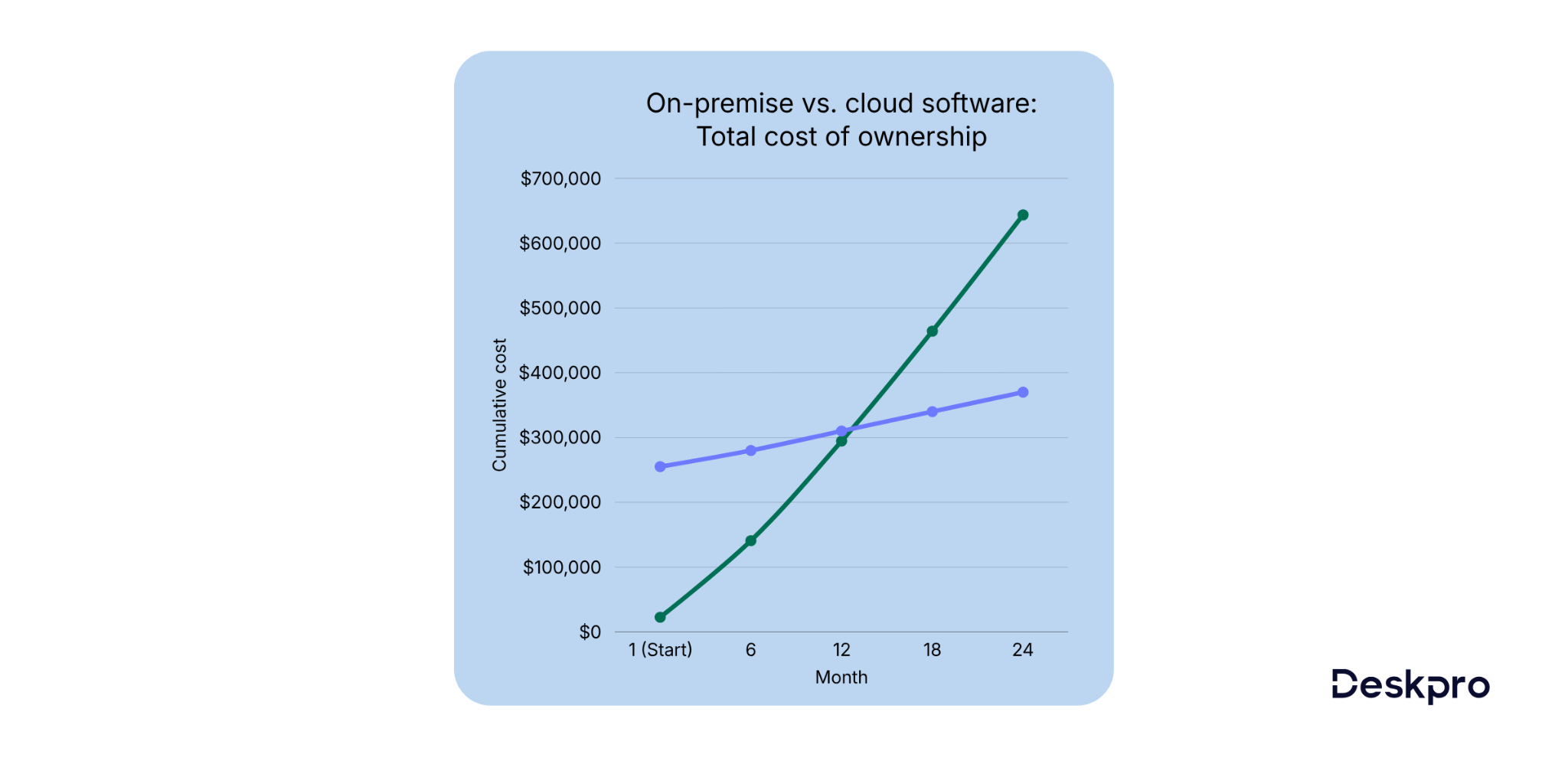
With on-premise software, there are no recurring subscription fees, and you get full control over your landscape to optimize operations, save on data storage costs, and maintain high computational capacities.
Secure AI: Mitigating risk with on-premise deployment
We’ve covered some of the key reasons business leaders choose on-premise software, but there’s another benefit that’s worth calling out in its own section: secure AI.
Many organizations in regulated industries are unable to use public large language models (LLMs) because they run on public cloud infrastructure. While data fed into a prompt (or indexed with the LLM) is typically encrypted in transit, it must be decrypted at the point that it is processed by the LLM. This raises the risk of prompt injection: a type of attack in which bad actors insert hidden prompts into legitimate ones to get an LLM to reveal sensitive information or behave in unintended ways.
While major cloud providers invest billions in defensive measures, no public environment is entirely immune to these threats. For organizations in highly regulated sectors, even a marginal risk is often unacceptable.
Transitioning to an on-premise AI model provides the ultimate safeguard, allowing you to leverage the power of privately deployed LLMs. Your organization gets the productivity benefits of AI without compromising your security protocols or regulatory mandates.
The hybrid cloud: A strategic middleground
In recent years, IT leaders have increasingly shifted away from thinking of cloud and on-premise deployments as a binary choice. Instead, they’re adopting a hybrid cloud approach, deploying applications that handle sensitive data (such as their help desk and CRM) on-premise for maximum security and performance while running less sensitive applications in a public cloud.
This can be a cost-effective approach: you can run applications with stable and predictable resource demands on-premise while running applications with highly variable workloads in the cloud.
The hybrid model also provides a secure path to AI deployment. While the public cloud offers massive compute power for training models, the "inference" (the actual processing of user prompts) is increasingly being pulled back to on-premise environments to prevent data leakage. By using a hybrid infrastructure, you can plug into advanced AI tools while ensuring that your sensitive data never leaves your private network.
Implementation considerations for on-prem success
While on-premise software offers significant advantages such as customization, security, reliability, and cost savings in the long run, it’s important to be aware of potential challenges and address them as you plan your implementation. Here’s a high-level overview of implementation considerations and best practices.
|
Consideration |
Best practice |
|
Infrastructure and maintenance: Managing on-premise software requires continuous infrastructure maintenance, patching, and security updates. |
Establish a dedicated IT team well-versed in the software's nuances. If you don’t want to manage the IT resources internally, consider working with a managed services provider. |
|
Scaling and flexibility: Scaling on-premise solutions may demand additional hardware, server space, or software licenses, potentially leading to limitations in flexibility. |
Forecast your organization's growth and plan ahead by designing a scalable IT infrastructure that evolves with the company's needs, striking a balance between resource allocation and flexibility. |
|
Disaster recovery and backups: With in-house data storage, there's an increased risk of data loss due to unforeseen events like hardware failures or natural disasters. |
Implement scheduled backups and ensure you have a well-planned disaster recovery strategy, minimizing downtime and safeguarding your organization's precious data. |
|
AI computing: Running LLMs on-premise requires specialized hardware (GPUs). |
Audit your server hardware for AI readiness. If local compute is limited, use a Hybrid Inference model: keep sensitive data processing on-premise while using secure API endpoints for generic computational tasks. |
The way forward with on-premise software
We've covered a lot of ground exploring the on-premise and hybrid cloud software landscape. From performance and reliability to cost considerations and meeting specialized needs, on-premise offers compelling benefits:
- Infrastructure and data control to meet security and compliance requirements
- Consistent performance and fast processing
- Cost structures that pay off long-term
- Secure AI usage
Yes, the cloud offers perks like scalability and low upfront costs. But for businesses prioritizing data control, performance stability, and long-term cost savings, on-premise can't be beaten. It's not just an alternative but a strategic choice to align operations with corporate objectives.
Interested in learning more?
Check out Deskpro Private, our help desk software with flexible deployment models and the option to connect your own AI models. Book a demo to see how it can meet your on-premise help desk needs.